⚡ Flash Sonoff
Flash relay firmware to your Sonoff TH — no Arduino IDE needed
📋 BEFORE FLASHING
Wire your FTDI/serial adapter
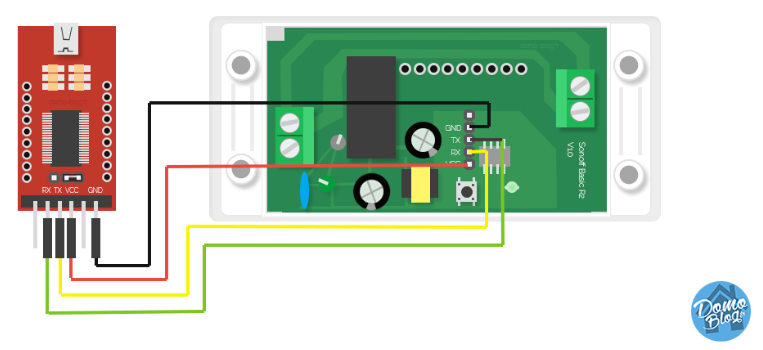
Connect 3.3V→VCC GND→GND TX→RX RX→TX — use 3.3V only, never 5V!
Enter flash mode (bootloader)
1) Disconnect the USB adapter from your PC
2) Find the small button on the Sonoff PCB board and hold it down
3) While still holding the button, plug the USB adapter into your PC
4) Keep holding for 2-3 seconds, then release
5) The Sonoff is now in flash mode — no LEDs will blink, that's normal
Click the button below
Select your COM port when prompted. Flashing takes about 30 seconds.
Use Chrome or Edge.
This page must be served from control.drb.wang.
🔧 CONFIGURE VIA USB
After flashing, configure WiFi & relay number directly over USB — no captive portal needed!
📱 ALTERNATIVE: CAPTIVE PORTAL
1. Unplug USB and replug without holding the button
2. Connect to WiFi: SonoffRelay-Setup (password:
12345678)3. Open
192.168.4.1 in your browser — enter WiFi & relay settings4. Hit Save & Connect
💡 To reconfigure later: Hold the Sonoff button for 5 seconds
🔧 DRIVERS & TROUBLESHOOTING
CH340 USB Driver — needed if your serial adapter isn't detected:
📥 Download CH340 Driver (Windows)Extract the zip → run the installer → replug your USB adapter
Can't get the flash to work? Try the Tasmota Web Flasher as a test:
🔗 Tasmota Web Flasher (test your setup)• Firmware:
Tasmota (ESP8266 version, NOT ESP32)• After flashing Tasmota, configure:
Module Type → Sonoff TH• GPIO12 = Relay, GPIO13 = LED, GPIO0 = Button
• If Tasmota flashes OK, your wiring and driver are correct — come back here and flash our custom firmware